Using Landsat & EJI data to analyze the effects of California’s wildfires.
MEDS
Python
Geospatial
Author
Affiliation
Zach Loo
Master of Environmental Data Science @ The Bren School, UCSB
Published
November 23, 2025
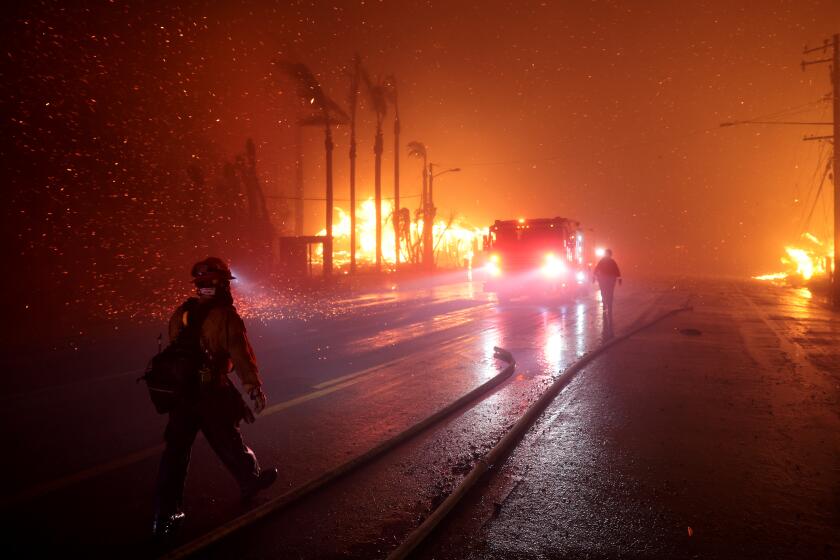
Firefighters battle house fires along the Pacific Coast Highway in Malibu, January 2025 (Wally Skalij / Los Angeles Times)
About
Background & Purpose
The 2025 Palisades and Eaton wildfires were highly destructive fires in the Los Angeles County. The fires claimed a combined total of over 30 lives, 37,000 acres of land, and 15,000 buildings (CAL FIRE, 2025). This analysis contains two tasks related to the fires: 1. Practice working with xarray data and creating images from remote sensing data, 2. Practice working with census data and visualizing Environmental Justice Index (EJI) variables within the wildfire’s extent.
GitHub Links
This blog post is a combination of materials completed in the MEDS EDS 220 course regarding the 2025 California wildfires. Task 1 stems from Homework 4 and Task 2 is from the Week 8 Discussion. For more information, see the following GitHub links.
- Visualize socio-economic distributions of EJI variables
Data
Fire perimeter data: Sourced from CAL FIRE hosted by California’s Open Data Portal. This dataset contains information and geometries for wildfires in California.
Landsat data: Sourced from the Landsat Collection 2 Level-2 atmosperically corrected surface reflectance data, courtesy of the Landsat 8 satelliite.
EJI data: Sourced from the Centers for Disease Control’s (CDC) Geospatial Research, Analysis, and Services Program (GRASP). These data are contained within a GeoPackage and contains measurements on numerous socioeconomic and health variables.
CAL FIRE. (2025). Top 20 Most Destructive California Wildfires. California Department of Forestry and Fire Protection. https://34c031f8-c9fd-4018-8c5a-4159cdff6b0d-cdn-endpoint.azureedge.net/-/media/calfire-website/our-impact/fire-statistics/top-20-destructive-ca-wildfires.pdf?rev=582019785a994dccb61e8f554f4d3c2b&hash=97ECEED23181B02019118DB38B63ABBC
# Load packagesimport osimport numpy as npimport pandas as pdimport matplotlib.pyplot as pltimport geopandas as gpdimport xarray as xrimport rioxarray as rioxrfrom janitor import clean_namesimport contextily as ctxfrom matplotlib.lines import Line2D
The .head() method will display the columns and first five rows of a pandas DataFrame, making it a great start for some initial data exploring.
Code
perimeter_data.head()
objectid
year_
state
agency
unit_id
fire_name
inc_num
alarm_date
cont_date
cause
c_method
objective
gis_acres
comments
complex_name
irwinid
fire_num
complex_id
decades
geometry
0
1
2025.0
CA
CDF
LDF
PALISADES
00000738
Tue, 07 Jan 2025 08:00:00 GMT
Fri, 31 Jan 2025 08:00:00 GMT
14
7.0
1.0
23448.8800
None
None
{A7EA5D21-F882-44B8-BF64-44AB11059DC1}
None
None
2020-January 2025
MULTIPOLYGON (((-13193558.265 4032826.467, -13...
1
2
2025.0
CA
CDF
LAC
EATON
00009087
Wed, 08 Jan 2025 08:00:00 GMT
Fri, 31 Jan 2025 08:00:00 GMT
14
7.0
1.0
14056.2600
None
None
{72660ADC-B5EF-4D96-A33F-B4EA3740A4E3}
None
None
2020-January 2025
MULTIPOLYGON (((-13146936.686 4051222.067, -13...
2
3
2025.0
CA
CDF
ANF
HUGHES
00250270
Wed, 22 Jan 2025 08:00:00 GMT
Tue, 28 Jan 2025 08:00:00 GMT
14
7.0
1.0
10396.8000
None
None
{994072D2-E154-434A-BB95-6F6C94C40829}
None
None
2020-January 2025
MULTIPOLYGON (((-13197885.239 4107084.744, -13...
3
4
2025.0
CA
CCO
VNC
KENNETH
00003155
Thu, 09 Jan 2025 08:00:00 GMT
Tue, 04 Feb 2025 08:00:00 GMT
14
2.0
1.0
998.7378
from OES Intel 24
None
{842FB37B-7AC8-4700-BB9C-028BF753D149}
None
None
2020-January 2025
POLYGON ((-13211054.577 4051508.758, -13211051...
4
5
2025.0
CA
CDF
LDF
HURST
00003294
Tue, 07 Jan 2025 08:00:00 GMT
Thu, 09 Jan 2025 08:00:00 GMT
14
7.0
1.0
831.3855
None
None
{F4E810AD-CDF3-4ED4-B63F-03D43785BA7B}
None
None
2020-January 2025
POLYGON ((-13187991.688 4073306.403, -13187979...
After getting a general idea of the dataframe’s contents, we can go further and explore specific columns like decades. Additionally, since this is a pandas GeoDataFrame with spatial information, we must check the Coordinate Reference System (CRS). The CRS of this data must match the other data in this analysis to plot accurate maps but this will be dealt with later.
Code
print(f"Decades Value Counts:\n{perimeter_data['decades'].value_counts()}\n")print(f"Coordinate Reference System (CRS): {perimeter_data.crs}\n")print(f"Is this CRS projected?: {perimeter_data.crs.is_projected}")
Decades Value Counts:
decades
1950-1959            7012
2010-2019            3425
2000-2009            2905
1980-1989            2208
2020-January 2025    2036
1990-1999            1992
1970-1979            1879
1960-1969            1276
Name: count, dtype: int64

Coordinate Reference System (CRS): EPSG:3857

Is this CRS projected?: True
Fire perimeter description: The fire perimeter data was downloaded from CAL FIRE hosted by California’s Open Data Portal. Some preliminary findings about the data included the unique observation counts of the decades variable. This shows how many observations of wildfires there are for each decade group in the data. Next, the CRS was shown to be EPSG:3857 and it is also a projected CRS, meaning it is two-dimensional as opposed to geographic CRSs which use a three-dimensional spherical surface.
Fire Perimeters Initial Plot
Code
# Filter perimeter data to fires of interestpalisades_eaton = perimeter_data[(perimeter_data['fire_name'].isin(['PALISADES', 'EATON'])) & (perimeter_data['year_'] ==2025)]# Initial plotpalisades_eaton.plot()
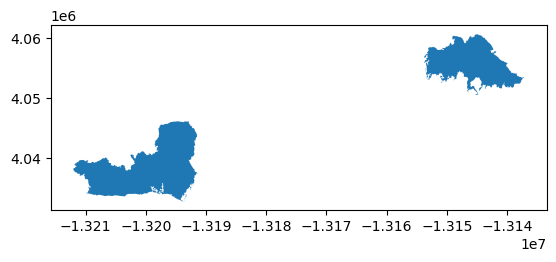
Above is the initial map of the wildfire perimeters of interest: Palisades (left) and Eaton (right).
Data variables:
    red          (y, x) float32 16MB ...
    green        (y, x) float32 16MB ...
    blue         (y, x) float32 16MB ...
    nir08        (y, x) float32 16MB ...
    swir22       (y, x) float32 16MB ...
    spatial_ref  int64 8B ...

Coordinates:
  * y        (y) float64 11kB 3.799e+06 3.799e+06 ... 3.757e+06 3.757e+06
  * x        (x) float64 22kB 3.344e+05 3.344e+05 ... 4.166e+05 4.166e+05
    time     datetime64[ns] 8B ...

Time Value: 2025-02-23T18:28:13.651369000

Dimensions: FrozenMappingWarningOnValuesAccess({'y': 1418, 'x': 2742})
Landsat description: Preliminary exploration of the Landsat data yielded information on the data’s dimensions, coordinates, and variables. This is an xarray Dataset, thus it contains 2D numpy arrays for each variable present in the data. These variables are each a spectral band collected by the Landsat 8 satellite. The coordinates of the variables are also included in the data and these are geospatial x and y coordinates. Given that they’re in scientific notation like “3.799e+06”, these coordinates are likely in meters. Additionally, there is a time coordinate but there is only one value since this data is only from one point in time. This time value was extracted and the data is from February 23, 2025. Last, the dimensions of the variables were found and they have a length of 2742 in the x coordinate and 1418 in the y coordinate.
Currently, the geospatial information like Coordinate Reference System (CRS) isn’t loaded correctly into the data, indicated by “None” output in the above cell. However, this CRS information is stored within the data variable spatial_ref and can be accessed.
PROJCS["WGS 84 / UTM zone 11N",GEOGCS["WGS 84",DATUM["WGS_1984",SPHEROID["WGS 84",6378137,298.257223563,AUTHORITY["EPSG","7030"]],AUTHORITY["EPSG","6326"]],PRIMEM["Greenwich",0,AUTHORITY["EPSG","8901"]],UNIT["degree",0.0174532925199433,AUTHORITY["EPSG","9122"]],AUTHORITY["EPSG","4326"]],PROJECTION["Transverse_Mercator"],PARAMETER["latitude_of_origin",0],PARAMETER["central_meridian",-117],PARAMETER["scale_factor",0.9996],PARAMETER["false_easting",500000],PARAMETER["false_northing",0],UNIT["metre",1,AUTHORITY["EPSG","9001"]],AXIS["Easting",EAST],AXIS["Northing",NORTH],AUTHORITY["EPSG","32611"]]
Now the .spatial_ref.crs_wkt can be applied with .rio.write_crs() and the DataSet’s geospatial information will be loaded correctly and it’s ready to be mapped.
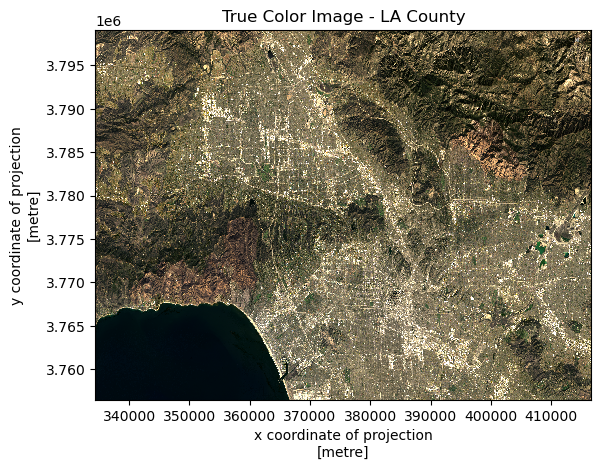
In true color images, each band is mapped to its corresponding visible color wavelength, producing an image that closely resembles what the human eye would see from space. This provides an intuitive view of the area, making it useful for identifying features like green vegetation, urban areas, and water bodies.
Code
fig, ax = plt.subplots()# Fill nans with 0 & plotlandsat_data[['red', 'green', 'blue']].fillna(value=0).to_array().plot.imshow(robust=True)plt.title("True Color Image - LA County")plt.show()
Initially trying to plot the true color image came with two issues. One, extreme values (mainly from clouds) in the Landsat data were affecting the color plotting. To fix this, setting the robust=True made xarray ignore the top and bottom 2% extreme color values and the true color image could be seen. Next, invalid values were also present in the data. These were np.nanvalues and xarray doesn’t know what to do with these. Instead, we replace these with zero with .fillna() and we end up with a final true color plot with no warnings.
False Color Image
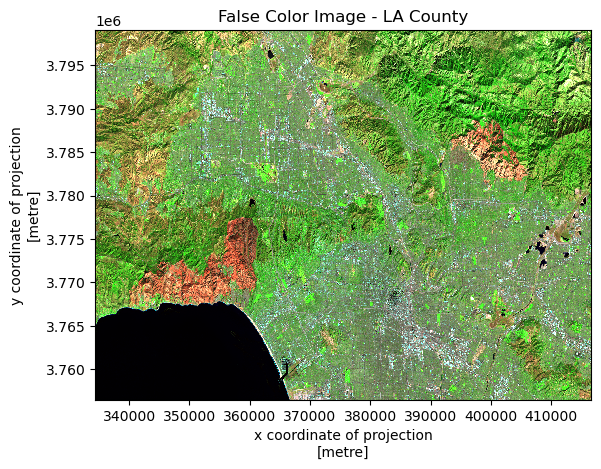
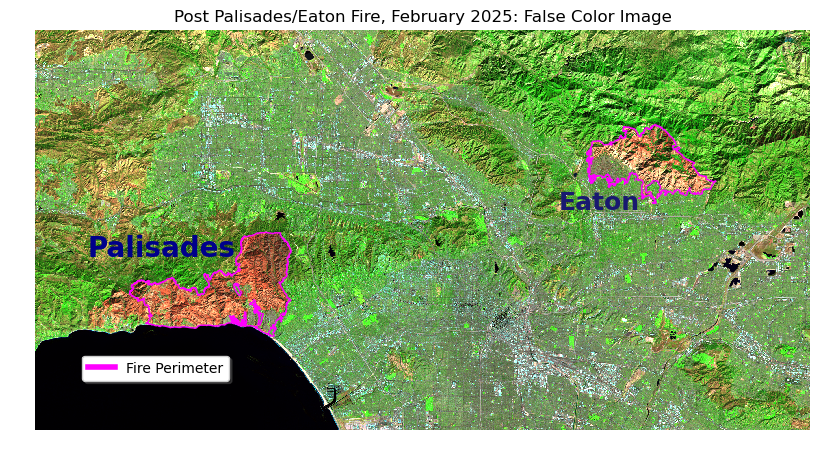
False color images take advantage by using wavelengths that are invisible to the human eye. These are created by mapping non-visible and visible Landsat bands to the red, green, and blue channels. Using shortwave infrared (SWIR2), near-infrared (NIR), and red bands, allow features to stand out that would be more difficult to see in true color. False color images are especially useful for highlighting vegetation health, burn severity, and moisture differences, as vegetation and recently burned areas strongly stand out in the infrared wavelengths.
Code
fig, ax = plt.subplots()# Input different bands into rgb channels for false color imagelandsat_data[['swir22', 'nir08', 'red']].fillna(value=0).to_array().plot.imshow(robust=True)plt.title("False Color Image - LA County")plt.show()
The same techniques with the robust parameter and the .fillna() method were applied to obtain a false color image. Instead of assigning the red, green, and blue bands to the red, green, and blue channels, a different band combination (SWIR, NIR, red) was assigned to the RGB channels. This created an image where areas affected by the fires stand out much more.
Combined Map
Now that we’re combining geospatial datasets of our fire perimeters and Landsat, we must make sure the CRSs match. Here, the perimeter data was matched to the Landsat CRS using .to_crs(). This combined figure overlays mapped fire perimeters for the Palisades-Eaton fires on a Landsat false color image. As mentioned before, the false color combination (SWIR2–NIR–Red) is effective for post-fire analysis since burned areas exhibit a strong contrast against non-burned areas. Overlaying the fire boundaries provides spatial context, allowing for the enhanced visual of the wildfire’s extent following the Palisades-Eaton fires in Los Angeles County.
Code
# Set crs of fire perimeter data to match landsat datapalisades_eaton = palisades_eaton.to_crs("EPSG:32611")# Initialize figurefig, ax = plt.subplots(figsize=(10,8))# Turn off axesax.axis('off')# Plot landsat false colorlandsat_data[['swir22', 'nir08', 'red']].fillna(value=0).to_array().plot.imshow(ax=ax, robust=True)# Plot fire perimeters on top of false color imagepalisades_eaton.plot(ax=ax, facecolor='None', edgecolor='fuchsia')# Add fire textax.text(x=340000, y=3775000, s="Palisades", fontsize=20, color='darkblue', weight='bold')ax.text(x=390000, y=3780000, s="Eaton", fontsize=18, color='midnightblue', weight='bold')# Custom legendcustom_line = [Line2D([0], [0], color='fuchsia', lw=4)]fig.legend(custom_line, ['Fire Perimeter'], loc=(0.1, 0.2), fontsize=10, shadow=True)plt.title("Post Palisades/Eaton Fire, February 2025: False Color Image")plt.show()
Again, short-wave infrared (SWIR) was assigned to the red channel, near-infrared (NIR) to the green, and red to the blue channel. This combination was used to see the effects after the January 2025 Palisades-Eaton fires. Areas affected by the fires standout as a bright orange, almost red color. Additionally, the actual perimeter of the fires are outlined in pink.
Task 2 Analysis
Load EJI Data
Code
# Load data from gdb filefp3 = os.path.join("data", "EJI_2024_California", "EJI_2024_California.gdb")eji_data = gpd.read_file(fp3).clean_names()
Polygon Intersection
Before plotting the fire perimeter boundaries on top of the census data, the CRSs of the two datasets must match.
Code
# Change EJI CRS before joiningif perimeter_data.crs != eji_data.crs:print(f"No CRS match. Matching now to {perimeter_data.crs} ") eji_data = eji_data.to_crs(perimeter_data.crs)else:print("CRS match.")
No CRS match. Matching now to EPSG:3857
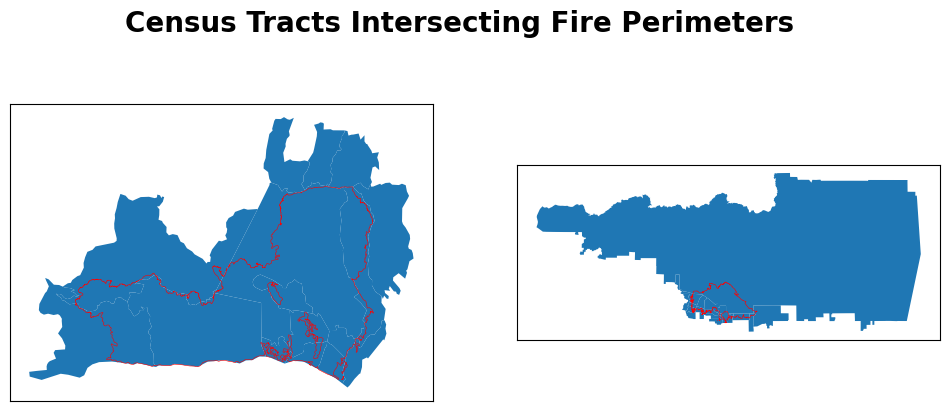
To identify census tracts intersecting fire perimeters, gpd.sjoin() was used to perform spatial joins with each fire perimeter. Doing these spatial joins, we’re left with only the census tracts that intersect our fire perimeters. We can confirm this by plotting the fire perimeters on top of the spatially subsetted census tracts.
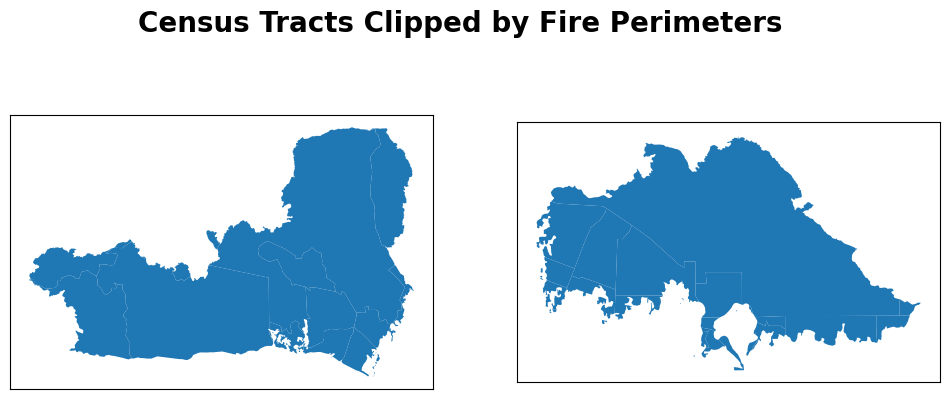
Continuing on the previous polygon intersections, using gpd.clip() clips the census tracts to the boundaries of the Palisades and Eaton fire perimeters. While the spatial join identified which tracts were affected, clipping restricts each tract to only the area that actually burned.
Code
palisades_clip = gpd.clip(gdf=palisades_census, mask=palisades_perimeter)eaton_clip = gpd.clip(gdf=eaton_census, mask=eaton_perimeter)fig, (ax1, ax2) = plt.subplots(1, 2, figsize=(12,5))for ax in (ax1, ax2): ax.set_xticks([]) ax.set_yticks([])palisades_clip.plot(ax=ax1)eaton_clip.plot(ax=ax2)fig.suptitle("Census Tracts Clipped by Fire Perimeters", size=20, weight='bold')plt.show()
Visualize with Basemap
Code
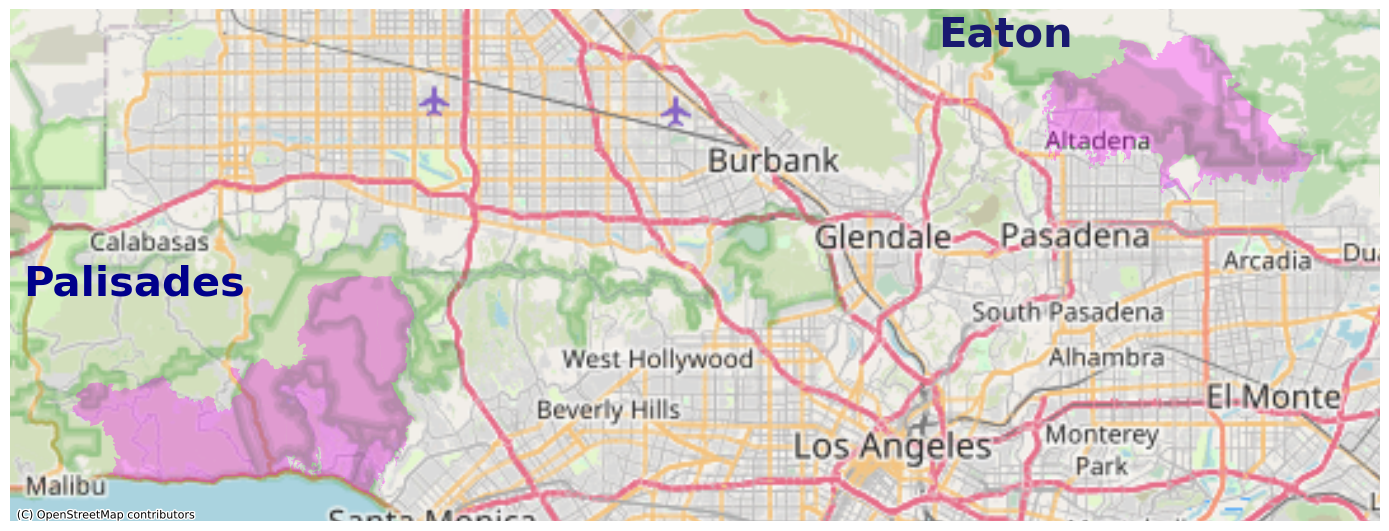
fig, ax = plt.subplots(figsize=(14, 12))# ADD FIRE PERIMETERS: UPDATE FILL TRANSPARENCY AND COLORpalisades_clip.plot(ax=ax, facecolor='fuchsia', alpha=0.3)eaton_clip.plot(ax=ax, facecolor='fuchsia', alpha=0.3)# Add basemap using contextilyctx.add_basemap(ax, source=ctx.providers.OpenStreetMap.Mapnik)# ADD LEGEND OR ANNOTATION TO IDENTIFY EACH FIREax.text(x=-13215000, y=4045000, s="Palisades", fontsize=30, color='darkblue', weight='bold')ax.text(x=-13160000, y=4060000, s="Eaton", fontsize=30, color='midnightblue', weight='bold')# ADD TITLEax.axis('off')plt.tight_layout()plt.show()
With the addition of the basemap, the fire perimeters (in pink) are placed within a larger geographical context and the surrounding Los Angeles County area can be seen.
Visualize with EJI Data
Code
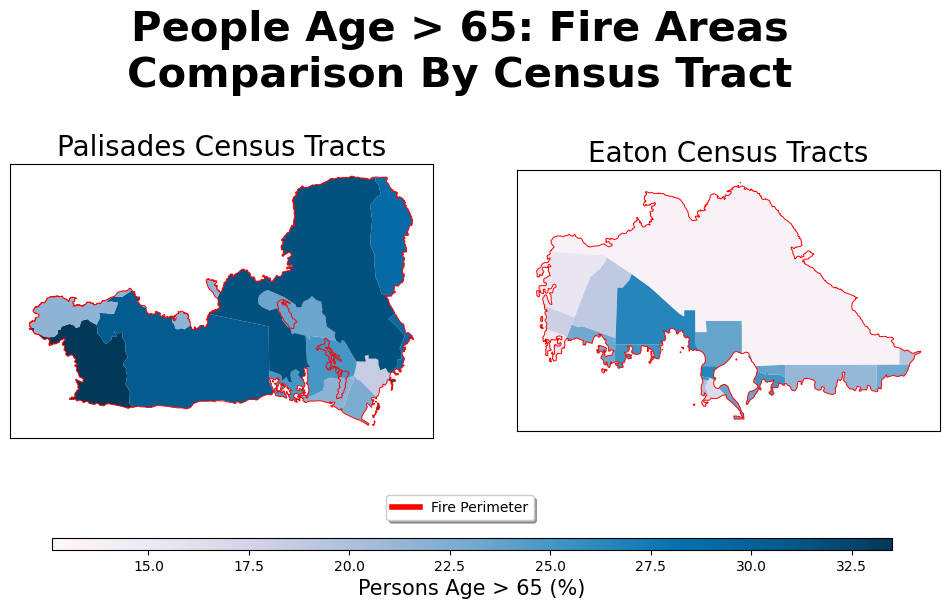
fig, (ax1, ax2) = plt.subplots(1, 2, figsize=(12, 6))for ax in (ax1, ax2): ax.set_xticks([]) ax.set_yticks([])# Set EJI variableeji_variable ='e_age65'# Find common min/max for legend rangevmin =min(palisades_census[eji_variable].min(), eaton_census[eji_variable].min())vmax =max(palisades_census[eji_variable].max(), eaton_census[eji_variable].max())# Plot census tracts within Palisades perimeterpalisades_clip.plot(column= eji_variable, vmin=vmin, vmax=vmax, legend=False, ax=ax1, cmap='PuBu')palisades_perimeter.boundary.plot(ax=ax1, edgecolor='red', linewidth=0.7)ax1.set_title('Palisades Census Tracts', size=20)# Plot census tracts within Eaton perimetereaton_clip.plot(column=eji_variable, vmin=vmin, vmax=vmax, legend=False, ax=ax2, cmap='PuBu')eaton_perimeter.boundary.plot(ax=ax2, edgecolor='red', linewidth=0.7)ax2.set_title('Eaton Census Tracts', size=20)# Add overall titlefig.suptitle('People Age > 65: Fire Areas\nComparison By Census Tract', size=30, weight='bold')# Custom legendcustom_line = [Line2D([0], [0], color='red', lw=4)]fig.legend(custom_line, ['Fire Perimeter'], bbox_to_anchor=(0.5, 0.15), loc='center', fontsize=10, shadow=True)# Add shared colorbar at the bottomsm = plt.cm.ScalarMappable(norm=plt.Normalize(vmin=vmin, vmax=vmax), cmap='PuBu')cbar_ax = fig.add_axes([0.16, 0.08, 0.7, 0.02]) # [left, bottom, width, height]cbar = fig.colorbar(sm, cax=cbar_ax, orientation='horizontal')cbar.set_label('Persons Age > 65 (%)', size=15)plt.show()
The final plot shows the California census tracts but only clipped to their respective fire perimeter. Additionally, the census tracts are colored by the e_age65 variable, which is an estimate of the percentage of population over the age 65 in that tract. With this variable, we can see the geographic distribution of percent elderly populations of each census tract. Overall, the Palisades area contain more census tracts with a greater percent of people older than 65, indicated by the darker blue.
Citation
BibTeX citation:
@online{loo2025,
  author = {Loo, Zach},
  title = {Visualizing the 2025 {California} {Wildfires}},
  date = {2025-11-23},
  url = {http://zachyyy700.github.io/posts/2025-11-22-cafires/},
  langid = {en}
}